Inside Zapier’s AI Playbook: Product Decisions that Drive Intelligent Automation
Making AI Work for Humans, One Zap at a Time
Making AI Work for Humans, One Zap at a Time
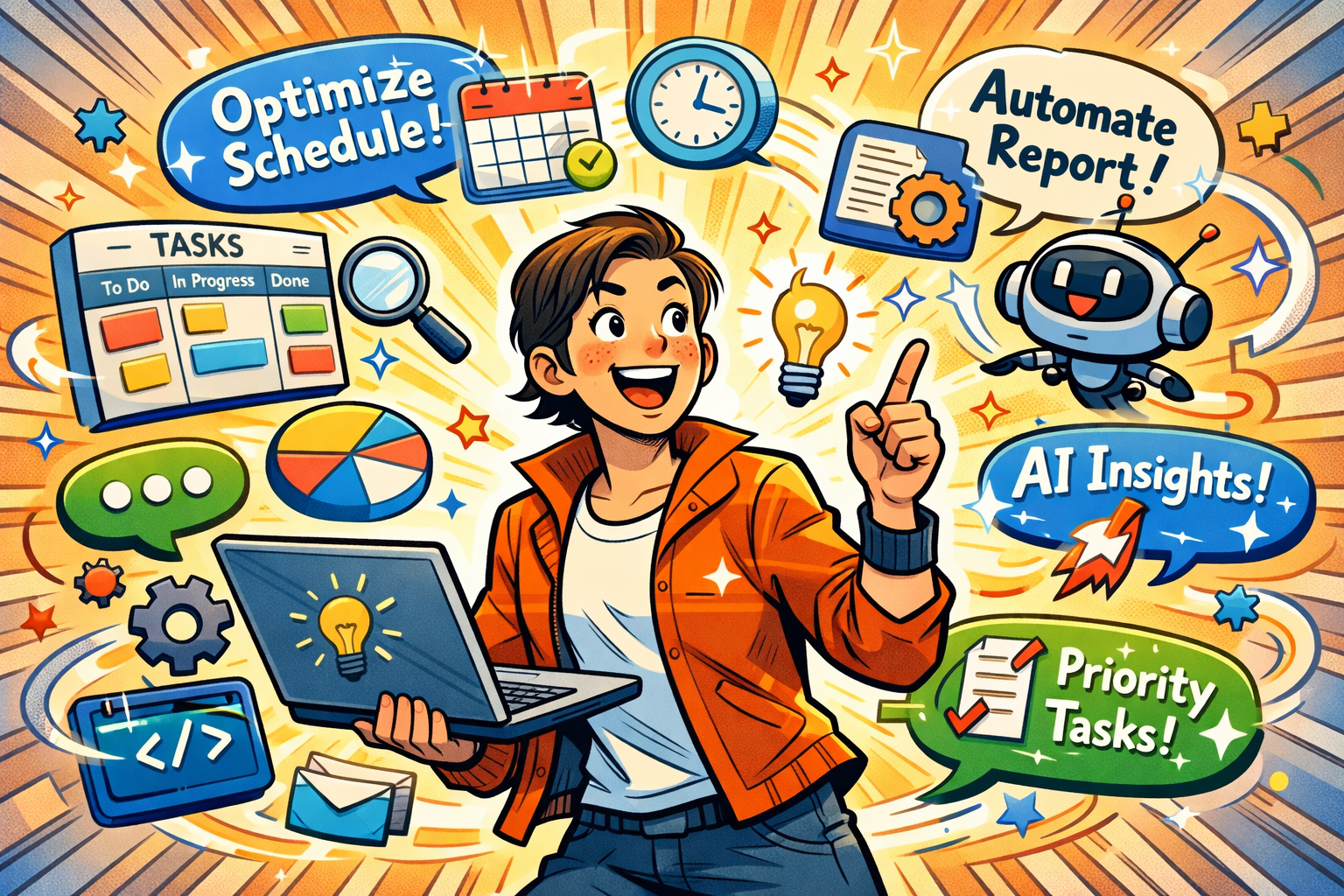
Introduction – Why Zapier’s AI Stands Out
I’ve been following Zapier for years, and one thing has always fascinated me: their ability to make automation feel magical without ever feeling overwhelming. And now, with AI baked into the platform, that magic has gotten a serious upgrade.
AI is everywhere these days — but too often, it’s just a buzzword slapped onto a product. Zapier is different. They’ve taken a human-first, outcome-driven approach, integrating AI in ways that actually help users automate work faster, smarter, and with fewer mistakes.
In this post, I’ll do a product teardown of Zapier’s AI capabilities from the lens of a product enthusiast who geeks out on design decisions and workflow strategy. Think of it as a friendly walkthrough where we explore how Zapier thinks about AI, why their decisions matter, and what we can learn from them.
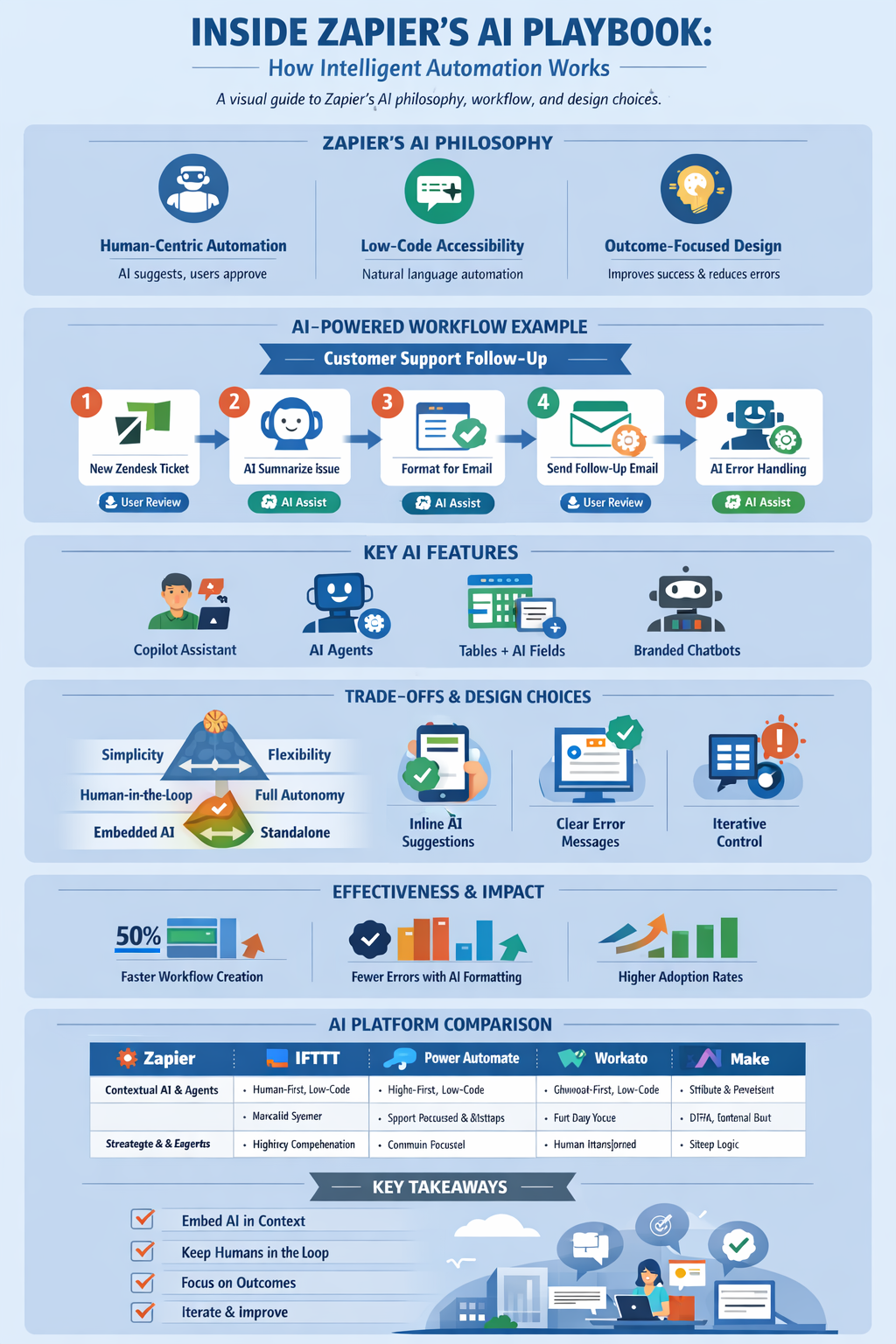
Zapier’s AI Philosophy in Practice
If there’s one thing that becomes clear when using Zapier AI, it’s that there’s a consistent philosophy guiding every feature:
Human-Centric Automation
Zapier AI doesn’t try to take over. Instead, it augments human decisions. When you create a workflow — like summarizing a new Zendesk ticket and emailing a customer — the AI drafts the steps for you but leaves final approval in your hands.
This is subtle, but it’s critical. Many AI-powered tools promise full autonomy, and users end up feeling out of control or mistrusting the system. Zapier’s approach: suggest, guide, empower. That builds trust, which is key to adoption.
Accessibility & No-Code/Low-Code
Zapier AI is designed for everyone, not just engineers. That’s why natural language automation exists: you describe what you want in plain English, and the AI converts it into multi-step workflows.
Even for power users, code steps are optional. You can customize, extend, and tweak, but the default path is low-friction and beginner-friendly. It’s this balance that makes Zapier stand out among AI-enabled automation platforms.
Outcome-Oriented Design
Every AI feature is measured by tangible impact: fewer errors, faster workflow creation, higher adoption. AI for AI’s sake? Zapier avoids that trap. The Copilot, AI Agents, and AI-powered formatting exist because they directly improve the productivity of workflows.
Feature-Level Teardown: How Zapier AI Really Works
Let’s take a closer look at Zapier AI in action. I picked a workflow that many of us deal with: automating customer support follow-ups. It’s simple on the surface but touches multiple apps, requires data formatting, and showcases how AI steps in exactly when you need it.
Step 1 – Natural Language → Workflow Creation
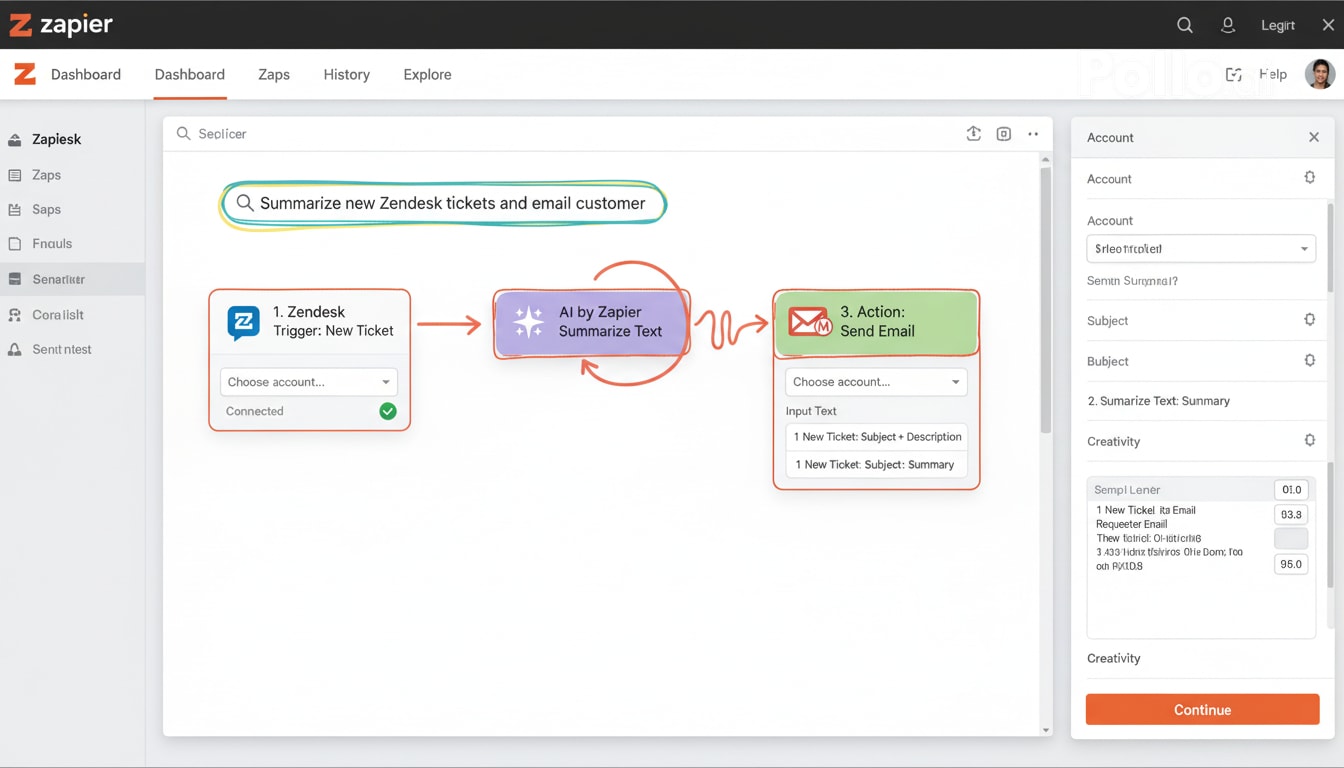
Here’s the part that feels almost magical. You type something like:
“Whenever a new support ticket is created in Zendesk, summarize it and email the customer a follow-up.”
And boom — Zapier AI interprets your instructions and builds a workflow for you:
- Trigger: New Zendesk ticket
- Action 1: AI summarization
- Action 2: Gmail follow-up email
No coding, no complicated mapping, just plain English. This is what low-friction automation feels like — and why non-technical users can confidently dive in.
Step 2 – AI-Powered Summarization
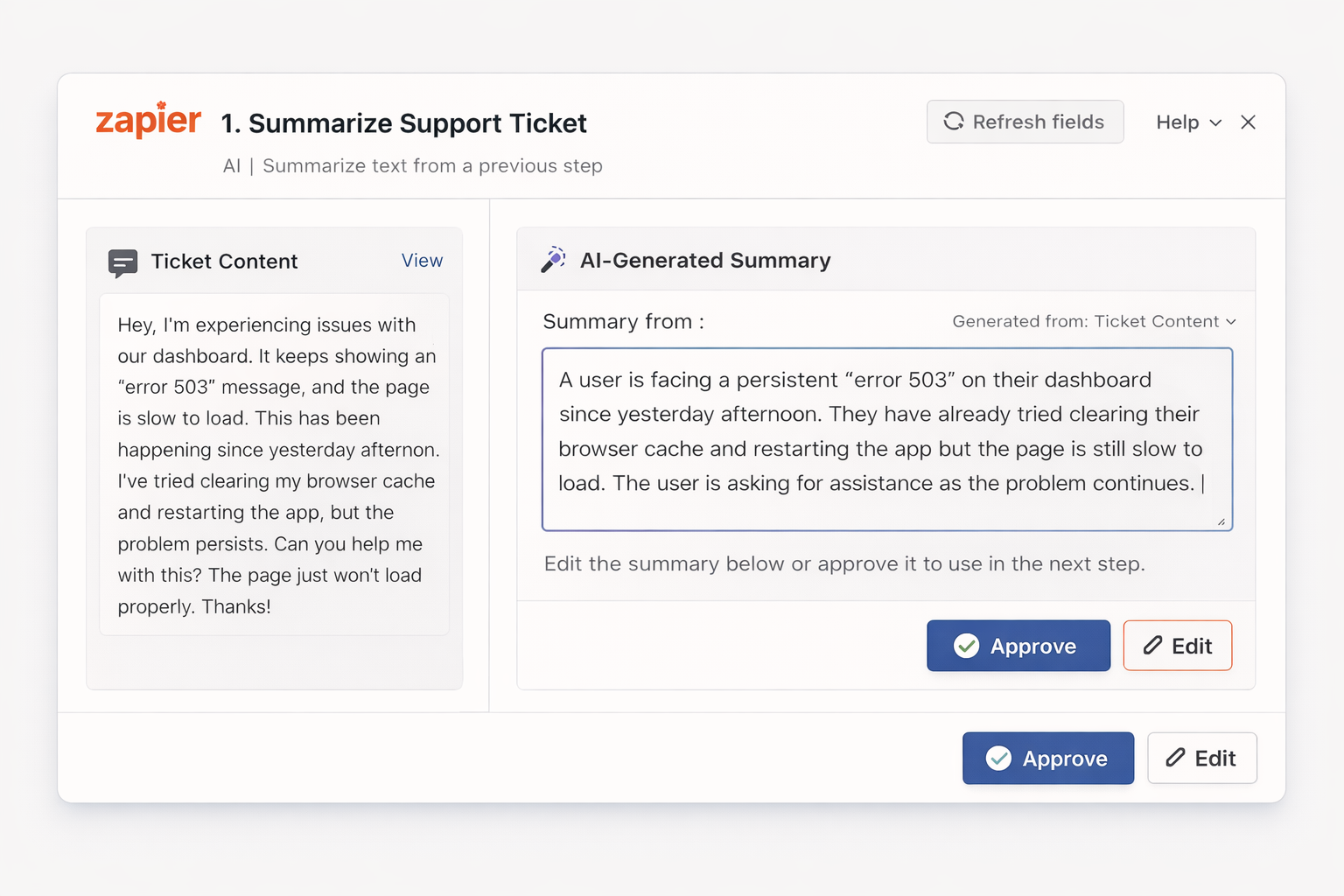
Now the AI rolls up its sleeves. It reads the ticket and creates a concise summary for your email.
- Pulls out the key points automatically
- Suggests professional, human-friendly phrasing
- Lets you approve or tweak the draft
The best part? You feel in control. The AI isn’t doing magic behind the curtain — it’s a collaborator, helping you work smarter, not faster blindly.
Step 3 – Data Formatting / AI Fields
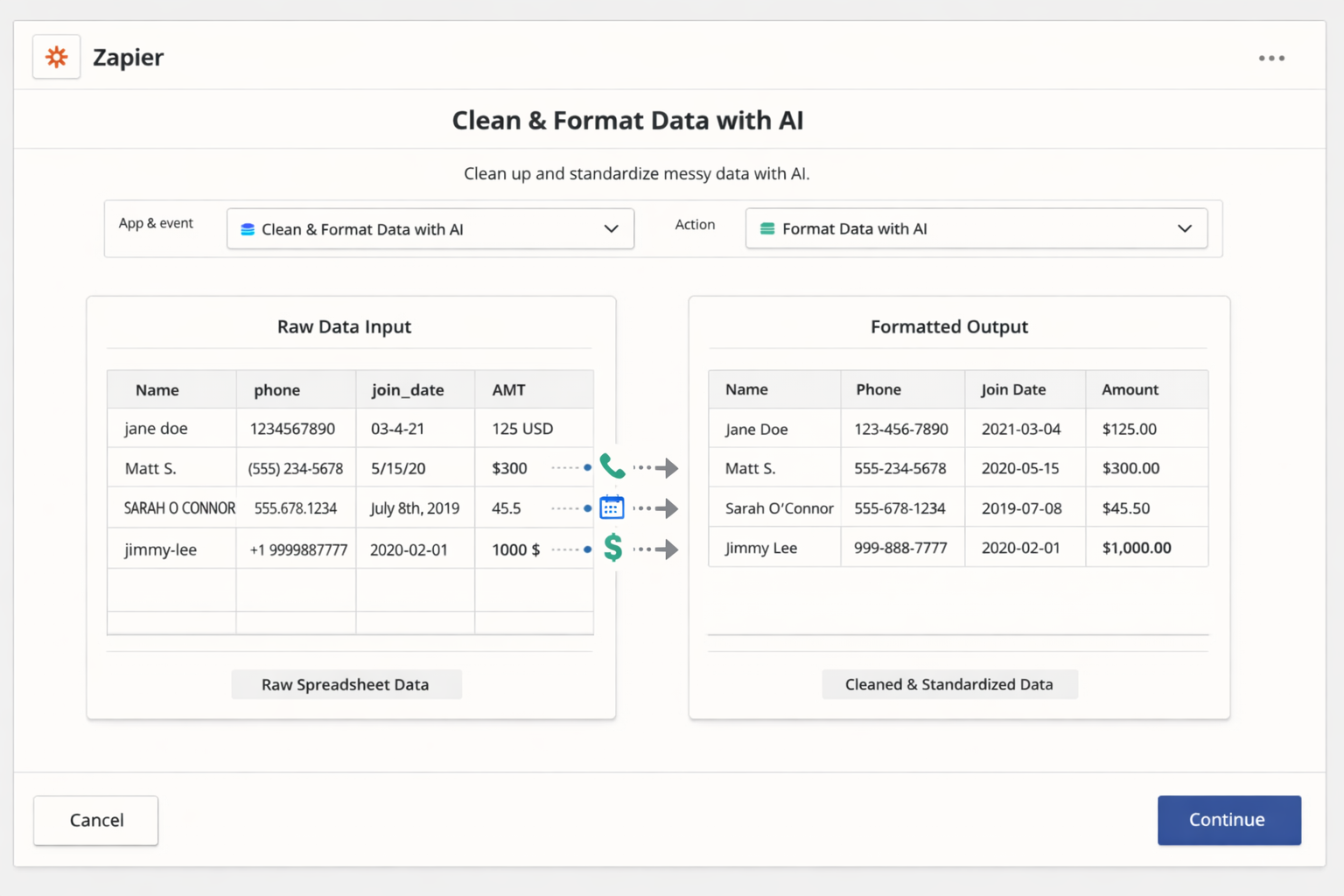
Here’s where the real time-saver kicks in. Often, the data from one app doesn’t quite match what another expects. Zapier AI steps in:
- Cleans up messy tables or lists
- Normalizes formats like dates, currencies, or capitalization
- Maps fields correctly across apps
Suddenly, what used to take minutes or even hours is done automatically, and your workflow runs smoothly without constant debugging.
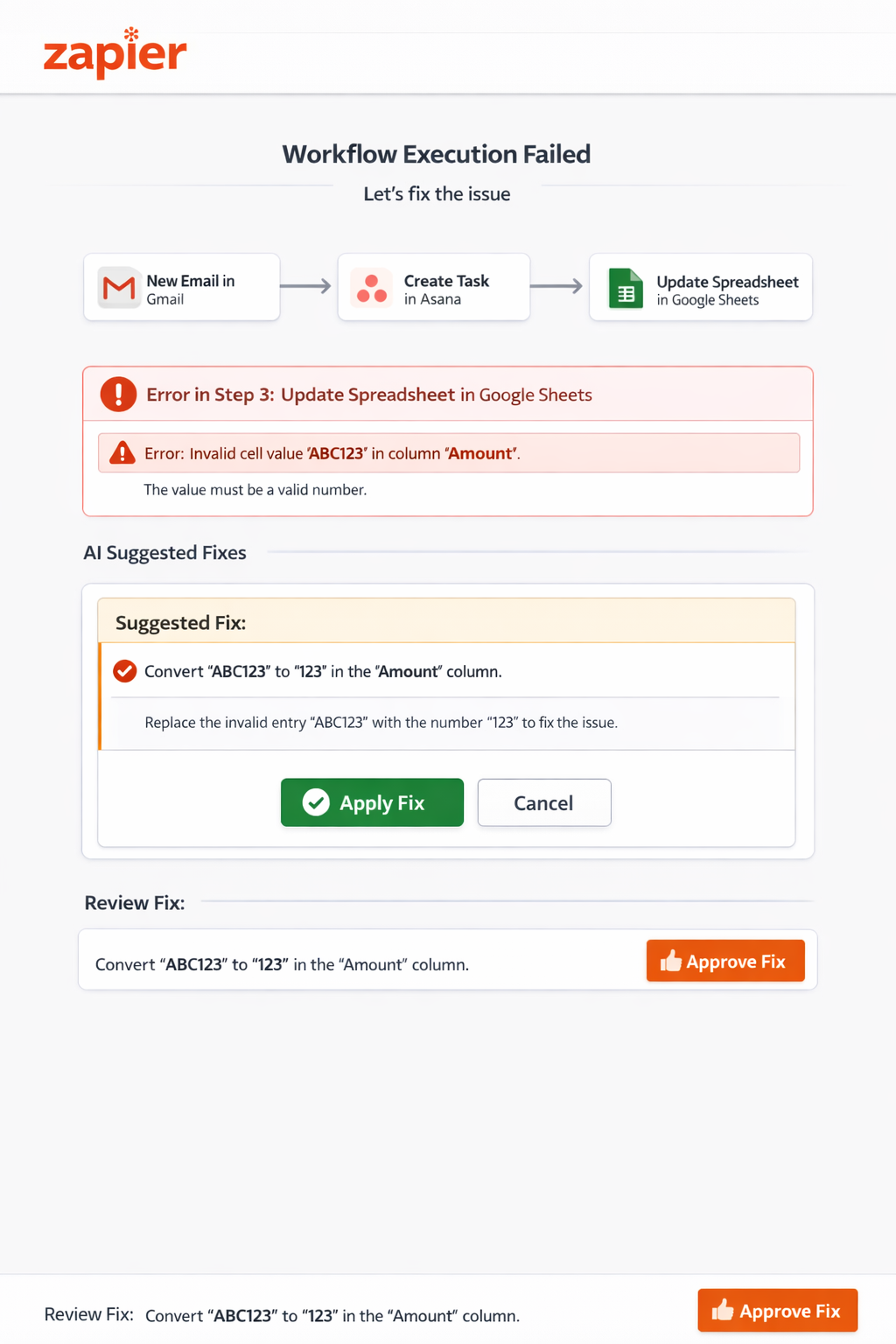
Step 4 – AI Troubleshooting & Error Handling
Even automated workflows aren’t perfect. But here, AI becomes your safety net:
- Detects errors or mismatched data
- Explains the problem in plain language
- Suggests actionable fixes
- Lets you approve the solution
This keeps users confident. You’re not blindly trusting AI — you’re guiding it, and it’s guiding you back. That’s a win-win for adoption and reliability.
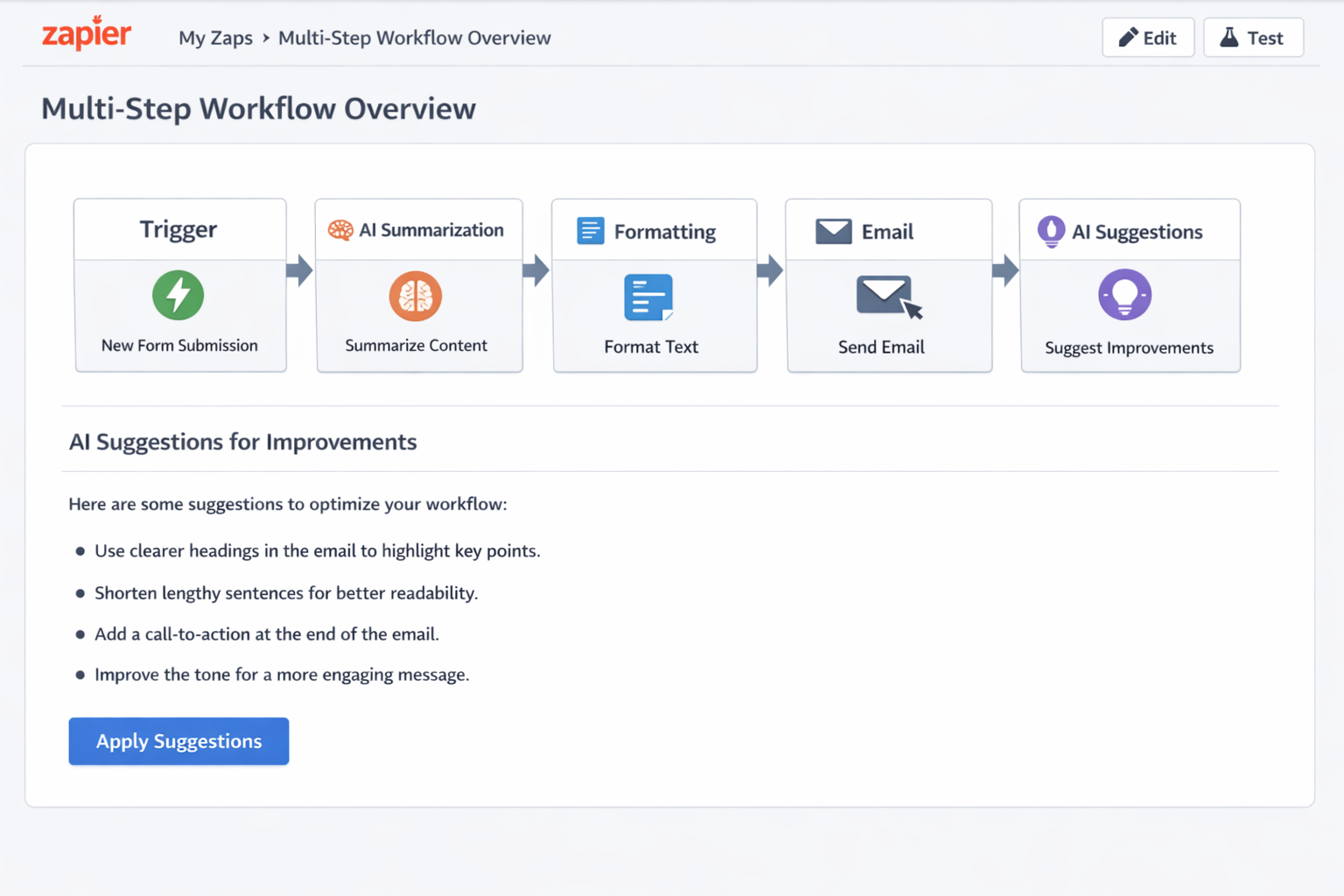
Step 5 – Multi-Step Workflow Overview
Finally, Zapier gives you a bird’s-eye view of the entire workflow:
- Trigger → AI Summarization → Data Formatting → Email → AI Suggestions
- Each step is clearly labeled with success indicators and AI involvement highlighted
It’s like looking at a roadmap. You can see how AI interacts with each part, spot bottlenecks, and understand dependencies at a glance. Perfect for reviewing workflows or onboarding new team members.
Other Capabilities That Excite Me
- Copilot Assistant: Generates workflows and provides real-time guidance
- AI Agents: Act autonomously across apps while remaining human-supervised
- Tables + AI Fields: Structure messy data automatically
- Branded Chatbots: Custom AI bots for internal or external workflows
Every feature feels deliberate — like Zapier thought, “How can we save users time while keeping them in control?”
Design and Product Decision Rationale
Now let’s get a bit nerdy and talk about why Zapier built features this way:
Why These AI Features Exist
- Natural Language Workflow Builder: Makes automation intuitive and fast
- AI Formatting & Summarization: Reduces cross-app errors
- AI Troubleshooting: Saves users time and frustration
- AI Agents: Scales complex automation while preserving human oversight
It’s clear every feature solves a real pain point — not just a tech experiment.
Trade-Offs Zapier Made
- Simplicity vs Flexibility: They prioritize an easy, frictionless path. Power users can code, but the default experience is simple.
- Human-in-the-Loop vs Full Autonomy: AI proposes, humans approve. This slightly slows execution but dramatically increases trust and adoption.
- Embedded AI vs Standalone Modules: Contextual AI reduces cognitive load, but you can’t see model internals. Seamless UX wins here.
UX Patterns That Work
- Step-wise guidance makes multi-step workflows easy to digest
- Inline AI suggestions keep users in the right context
- Plain-language error explanations reduce cognitive load
- Iterative control gives users ownership over AI outputs
Effectiveness Evaluation
Strengths
- Workflow creation is dramatically faster
- AI-driven formatting reduces errors
- Non-technical users can create complex workflows confidently
Areas for Improvement
- Multi-agent workflows still require oversight
- Advanced users may want finer control over AI steps
- Feedback loops could be more explicit to continuously train AI
Impact on Metrics
- Workflow success rate: Higher due to AI pre-processing
- Adoption: Increased via low-friction AI workflow creation
- Error rate: Lowered by troubleshooting suggestions
Comparisons / Context
| Platform | AI Focus | Strengths | Limitations |
|---|---|---|---|
| Zapier | Contextual AI in workflows, agents, troubleshooting | Human-in-the-loop, low-code, seamless across 8k+ apps | Less control for advanced AI logic |
| IFTTT | Basic triggers & actions, limited AI | Extremely simple, easy for beginners | No AI workflow generation |
| Power Automate | AI Builder, predictive workflows | Enterprise AI, deep Microsoft integration | Steep learning curve |
| Workato | AI-enhanced enterprise automation | Powerful multi-app integration | Complex, costly |
| Make (Integromat) | Visual scenario builder, minimal AI | Flexible logic visual builder | Lacks human-centric AI |
Zapier’s Edge:
- AI is human-first and contextual
- Natural language workflow creation makes it accessible and fast
- Trust-focused design ensures users adopt AI confidently
Lessons for AI Product Builders
- Embed AI in context: Don’t make users hunt for AI tools
- Keep humans in the loop: Trust comes from control
- Focus on real outcomes: Make AI useful, not just flashy
- Simplify complexity: AI should reduce friction, not add it
- Iterate with user feedback: Track adoption and edits to improve AI suggestions
Conclusion – Why I’m Excited About Zapier AI
As an enthusiast, what excites me most is how intentional every AI feature feels. Zapier isn’t just adding AI for the sake of hype — they’re thinking about user outcomes, workflow success, and human trust.
Every natural language workflow, AI summarization, and troubleshooting tip is designed to help users automate faster, more reliably, and with confidence.
For anyone building AI products, Zapier’s approach is a masterclass in balancing intelligence with usability, flexibility with simplicity, and automation with human oversight.
In short: Zapier makes AI feel like a superpower you actually want to use. And as someone who loves productivity tools, I’m here for it.
AI Workflow Audit
Want to apply this to your workflow?
I help B2B teams design human-approved AI workflow systems for CRM hygiene, lead research, content ops, and internal automation.
Book Free Review